intelliPROJECTS

Turnarounds & Capital Projects

The campaign, on one screen.

For the turnaround or project manager running the campaign. Read scope, schedule, cost, crew, and gates as one live picture, updated from the field every shift. Variance surfaces the day it appears.

Built in, not bolted on

The campaign, phase by phase. Gated to the decision.

Each phase carries its own gate and readiness score, then hands scope to the field and the proceed decision to the record.

  1. 01

    Scope & readiness

  2. 02

    Execution, lift by lift

  3. 03

    Cost & gates

Capabilities

Built around the work, step by step.

02 layers · scroll to stack

  1. 011 / 2

    Readiness Dashboard

    Scope freeze, critical path, gate scores, and blocking gaps on one leadership screen.

    Execution Wall Chart and Daily Progress Wizard

    Crew leads file task status, NPT, and emergent work as field data, not a morning email chain.

    Cost Command Center and Schedule S-Curves

    Commitments, variance, and critical-path performance, all scoped to the one turnaround or project event.


  2. 022 / 2

    Gate Review Workflow

    A defensible go, hold, or proceed decision, every condition and blocker owned in the trail.

For the turnaround or project manager

The whole campaign, one screen.

Read readiness and task completion at a glance

The field files the update

Gate the go decision

Real screens from the platform, not mockups

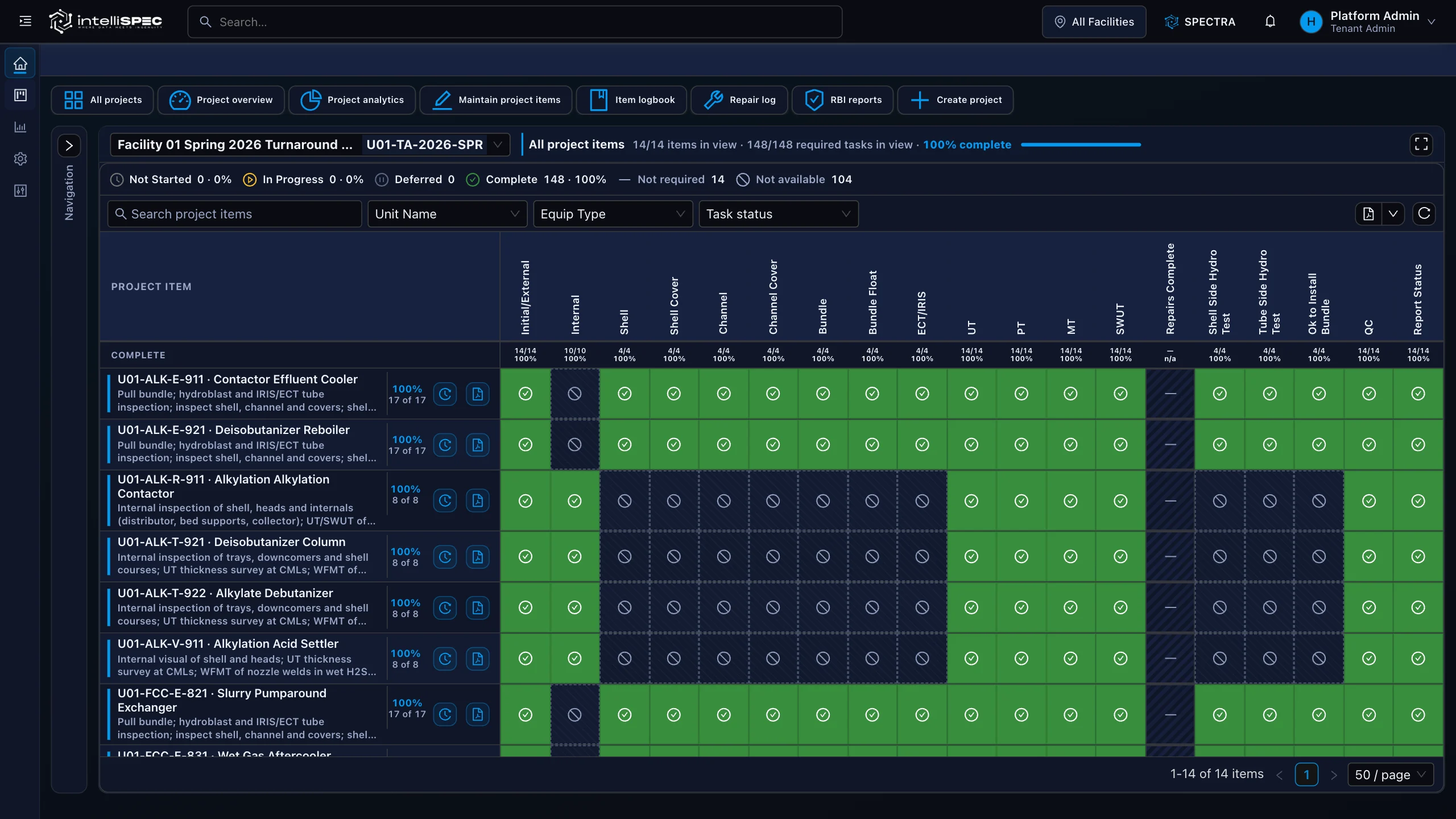
intelliPROJECTS · Execution wall chart
intelliPROJECTS execution wall chart tracking 14 project items and 148 required inspection, NDE, hydro, and QC tasks
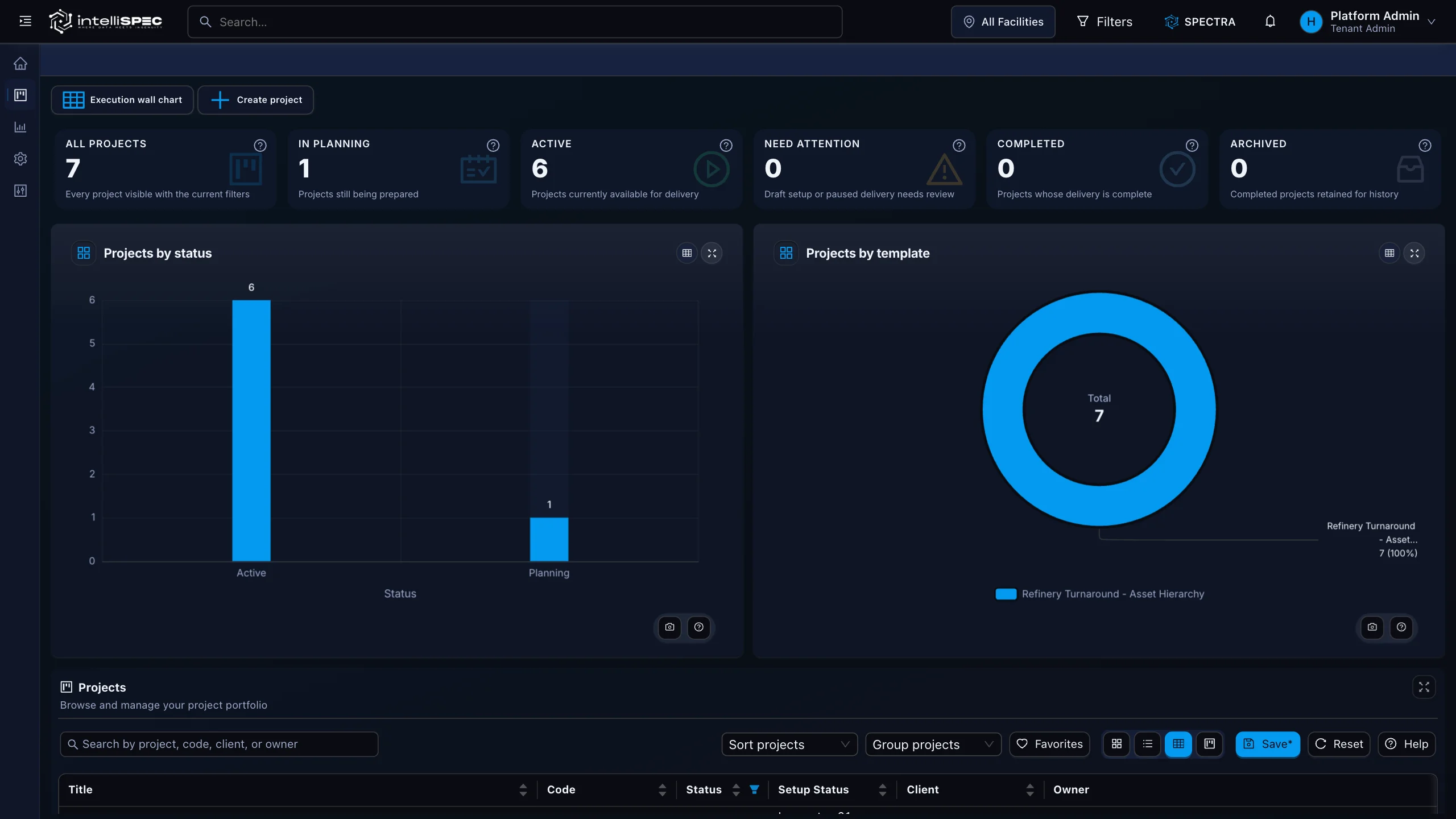
intelliPROJECTS portfolio showing active and completed turnaround campaigns by status and template

Grounded by design

Every gate decision, scope change, and emergent authorization traces to the standard it answers to.

Proof

Standards referenced

API 510API 570API 653ASMEOSHA PSM

Evaluation path

Give every reviewer the right evidence.

Request a contextual demo

Answers

intelliPROJECTS, in plain terms.

01What does intelliPROJECTS actually replace?

intelliPROJECTS does not replace a scheduling tool or CMMS. It sits alongside those systems as the campaign command center, reading scope, crew, schedule, and cost as one view and filling the reconciliation gap between them.

02How is emergent work handled?

Emergent items are logged in the field through the Daily Progress Wizard at the moment they surface. Each item goes through the same scoping, costing, crewing, and authorization workflow as planned work, so nothing disappears into an informal verbal approval.

03What gate review outcomes does the system support?

The Gate Review workspace supports four decisions: Proceed, Proceed with Actions, Hold, and Reject. Each decision carries a readiness score, open action list, blocker summary, and proceed conditions, all retained in the audit trail.

04How does intelliPROJECTS connect to integrity data?

Scope from intelliINTEGRITY feeds directly into the project and turnaround work list so the inspection program drives campaign scope. Crew comes from intelliCREW; materials come from intelliTRACK.

05Which standards does intelliPROJECTS support?

The module consumes API 510, API 570, and API 653 inspection scope from intelliINTEGRITY, and adds ASME-aligned work management, RAGAGEP-aligned change management, and an OSHA PSM-defensible audit trail.

06Who is the primary audience for intelliPROJECTS?

Turnaround managers, project managers, VP Operations, plant managers, and reliability directors, the roles most responsible for campaign cost, schedule, and compliance outcomes.

See intelliPROJECTS on your own asset.

See one asset workflow, from field record to audit evidence.