
intelliCREW

CREW, Workforce Readiness

Credentials enforced at the assignment, not the audit.

For schedulers who staff the campaign. Check every inspector's qualification against the work as you build the schedule, and the wrong assignment gets blocked before it locks.

Built in, not bolted on

The crew, qualified to the method. Checked at assignment.

Each inspector carries the methods they are qualified for, and the wrong one is blocked before the schedule locks.

  1. 01

    Coverage matrix

    Every inspector mapped against every method.

  2. 02

    Single-coverage risk

    Where only one qualified inspector remains.

  3. 03

    Renewal timeline

    Expiries plotted against renewal lead days.

Capabilities

Built around the work, step by step.

0101 / 04

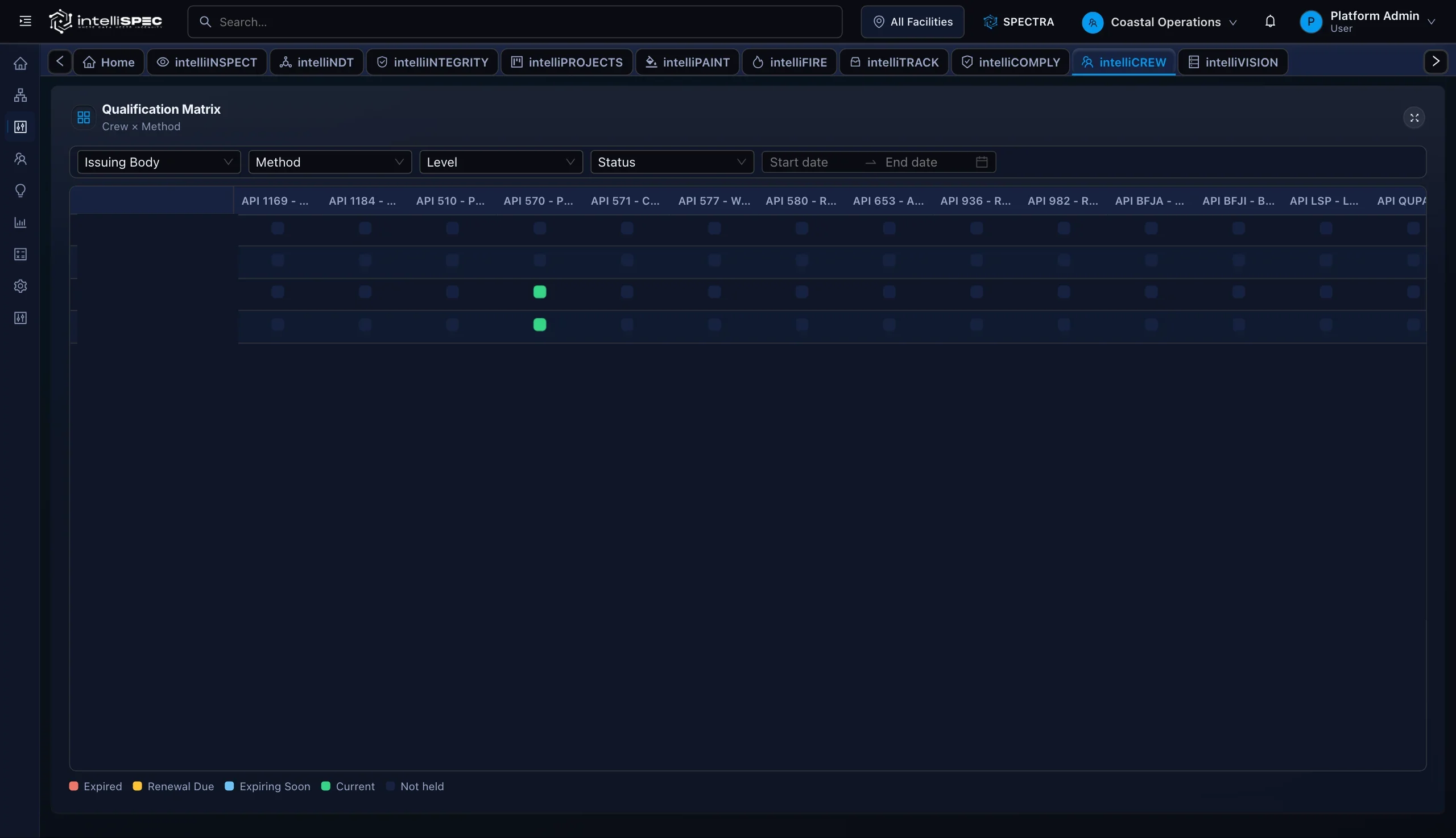
Qualification Coverage Matrix

Every inspector against every method, current or expiring, so staffing runs on live coverage.

0202 / 04

Workforce Readiness Dashboard

Renewals surfaced with lead time, and the method with one qualified inspector left flagged.

0303 / 04

Credential Lifecycle Tracking

A renewed certificate supersedes the old one and recalculates readiness, no manual cleanup.

0404 / 04

Qualification Import and Bulk Load

Import resolves inspectors and rejects bad records before they reach the active roster.

04 CAPABILITIES

Grounded by design

One model. Cited to the clause.

  • Reads the live digital twin, not a copy
  • Cites the API or ASME clause behind each result
  • Exports the full path to a result as one query

In the field

Where the work actually happens.

Qualification coverage matrix01

Qualification coverage matrix

Read every inspector against every method, current or expiring, so staffing runs on real coverage data.

Readiness at the schedule02

Readiness at the schedule

Confirm method coverage and single-inspector risk before the turnaround scope and crew plan lock in.

Credentials at the work03

Credentials at the work

The right API 570 or PAUT endorsement travels with the inspector from the office to the field.

How it works

From the field to the record.

  1. 01/ 03

    Build the roster

    Load inspector profiles through the Inspector Manager: name, employee ID, employment type (employee, contractor, or third party), and roster status. Each profile feeds every module that references crew.

  2. 02/ 03

    Attach qualifications

    Record or import qualification records with certificate number, issuing body, method code, level, issue date, and expiry. Renewal lead days are inherited from the qualification-type reference library (90 days for API 570 Inspector, 120 days for ASNT UT Level II) or overridden per record.

  3. 03/ 03

    Monitor and export

    The Workforce Readiness dashboard refreshes every five minutes. Export the Workforce Readiness Report (readiness status, coverage depth, single-coverage flags, and renewal timelines) as Excel or CSV for QA packs, staffing reviews, or audit response.

Proof

Every assignment answers to a qualification that was current the day the work was signed.

Standards referenced

API 510API 570API 653API 936API 1169ASMEAMPP/NACEAWS

Answers

intelliCREW, in plain terms.

Which certification standards does intelliCREW support?

intelliCREW ships with a seeded library covering API 570, ASNT UT and PAUT (Level I and II), ASNT RT Level II, AWS CWI, and NACE CIP Level 2. The platform also supports internal endorsements per tenant policy for API 510, API 653, API 936, API 1169, and ASME scopes.

How does intelliCREW handle credential expiry and renewal timing?

Each qualification record carries an expiry date and configurable renewal lead days (90 days by default, 120 days for advanced ASNT methods). The platform computes a renewal start date automatically and tracks credentials through four states: Active, Expiring Soon, Start Renewal Now, and Expired.

Can we import our existing qualification records?

Yes. The CSV import flow resolves inspectors by employee ID or full name, validates qualification type codes against the reference library, and rejects duplicate records at the batch level before they reach the active roster.

What does single-coverage risk mean?

A method is flagged as single-coverage risk when only one currently qualified inspector holds that certification. The Workforce Readiness dashboard shows how many days remain before that sole inspector's qualification expires.

How does intelliCREW connect to the rest of intelliSPEC?

Inspector profiles built in intelliCREW are referenced by intelliNDT work-pack planning. The Workforce Readiness surface includes a direct link to the NDT Work Pack Manager so qualification context stays visible alongside execution planning.

Is intelliCREW a replacement for our HR system?

No. intelliCREW is the credential enforcement layer, not a system of record for HR. Whatever credential store your team uses stays the system of record. intelliCREW enforces the credential at the moment of assignment.

See intelliCREW on your own asset.

See the failure before it happens. Prove the work after it is done.

Your asset class, configured live. No slides.